A Donkey at the Mad Hatter’s Tea Party

April 15th. Tax Day and Tea Party Rallies.

Since the Head Teabaggers will be migrating toward Washington, D.C. (see above for the video of this event), I guess I should do the same. I’ll be going not as a member of the Tea Party but as an observer. Political movements by their very nature are dynamic and filled with views and voices. I intend to hear some of these voices and gain a personal perspective on the movement. As they say, the best stories are often personalized stories and these experiences can be used towards another one of my projects. Continue reading

April Fool’s!

HAHAHAH! What a great day! Great laughs and great fun!

A short chronicle of the day’s hard-core conservative Republican attitude:

Obama bad. Rush good. Palin = Amazing! Drill baby drill! ♥ ♥ $$$. Stop mooching. No insurance? Don’t get sick. Rich only rich because we’re smart and work hard. Poor people just lazy. We’ll find the WMD’s. China evil except when they loan us money. “No” until 2012. Repeal the bill. That is all. http://www.facebook.com/brian.wells?v=feed&story_fbid=10100370050128391&ref=mf
Brian Wells is tired of all these unpatriotic liberals whining about freedom of speech, invasion of privacy, limits on health coverage, etc. Sick? Then get a job, buy insurance and stay healthy while you wait for things to be covered! Maybe you should have thought about those genes before you were conceived and you wouldn’t now have a genetic disorder. So stop being lazy and mooching off me. http://www.facebook.com/brian.wells?v=feed&story_fbid=10100369856276871&ref=mf
After 4 years of research and development, I’m pleased to announcement that my long-awaited army of ill-tempered super dolphins is ready. We couldn’t get the head-mounted lasers to work but the flipper-mounted plasma cannons do just fine. http://www.facebook.com/photo.php?pid=66260291&id=2004912&comments&ref=mf
I’ve agreed to take a consulting job with the conservative think tank AEI. Consultations will be done over the phone and email so I don’t even have to move. I’ll be working on the economic benefits of regulation-free banking, studying ways to run solar plants with coal and oil and lobbying to repeal health care reform and replace it with a reality show where contestants compete for insurance coverage. http://www.facebook.com/brian.wells?v=feed&story_fbid=107089942659163&ref=mf

While being a Republican was fun, it’s time to return to my liberal Democrat ways. 364 more days until I get to join the GOP ranks once again!

I Can Finally Say It

It feels good to finally come to terms with what I believe. I’ve tried to hide it for so long, acting like I believe in liberal ideas, pretending to care about the environment and global warming, believing in the unity of humanity. Now, I can finally admit it.

I’m a hard-core conservative Republican!

I have an autographed 5×7 of Ronald Reagan on my desk.

I dream of one day getting my book signed by Karl Rove and shaking the hand of Dick Cheney.

I think people should realize companies only have our best interests at heart. When we try to regulate them, we keep them from being best able to help us.

It feels good to finally come clean and stop pretending. Hopefully, the next time I have a revelation in my life, it won’t take me decades to realize it.

Share

A Changing Nation


President Obama

Today has the potential to be a great day for the United States of America. By day’s end, we should have health care reform, a goal that has taken decades, several presidencies, and wasted trillions of taxpayer dollars due to delays. The time is now. The moment is now. Our leaders have but to step forward and act for the American people to continue the dream of this nation and to fulfill our nation’s promise. We have bent, but we have not broken. By this time tomorrow, we shall have created a new contract with America that, while unpopular with some, will stand the test of time and be looked back on with wisdom by future generations.

The time to act has finally come at last.

Congress: The American people need you.

Share

Is it over yet?

I haven’t written here in a long time so here goes. I’m still sitting around reading for USMLE in a couple weeks. That pre-studying trip to Europe was awesome and I could certainly go for another one. Amsterdam, Paris, Bruges, Ieper, Poperinge, Brussels, Cologne and Frankfurt were all great. It would be a toss up between Bruges and Amsterdam for my favorite city, though I’d lean toward Bruges.

I have a couple ideas for some funny, informative, cutting edge articles but those will have to wait until after Step 1. Anyways, back to reading, practice questions, more reading, thoughts of jumping off a bridge somewhere…

Learnin’ pathways, debatin’ neocons and USMLE’in round the world

USMLE'in round the world

Born in Palatka,  Gator to the core, a hot-headed doctor named Brian Wells, he loves to debate but he loves one thing more – USMLE’in round the world! He studies his biochem, he studies his path, just go and ask him ’bout Brandt-Daroff, if there’s two things he loves  it’s USMLE’in and… USMLE’in round the world! Learnin’ pathways, debatin’ neocons, and USMLE’in round the world!
(to the melody of http://www.youtube.com/watch?v=X-DblXaqQMk)

Well, another week is here which means another set of days of USMLE Step 1 studying. The studying is going ok, it just feels tedious most of the time. Who would have thought that reviewing all the material covered in the first two years of medical school would be so “exciting.” Luckily, I have more than just my First Aid and Kaplan books. I never thought I’d be so glad to see a video lecture or hear Dr. Goljan’s voice after a few straight hours of reading, memorizing, reading, memorizing,… and so on. The “not thinking” part is getting to me because I’m definitely a critical thinking/ideas/concepts person and can think of nothing I dislike more than rote memorization, especially when I know my iPhone is laughing at me because it can “learn” all this information after about 10 seconds of uploading. However, it MUST be done and thus I press on. I’m not one to back away from a challenge but I will say this: I’m sending a cookie to the first person to figure out how to get neurons to interface with silicon chips.

Which brings me to my next topic: iPhone programming. There are LOTS of opportunities out there for mobile medical software that just require doctors and engineers to get together. I’ve got a few myself but right now I don’t have the expertise in objective C. I guess that’s what April and May will need to be for. If I could complete a product and push it out before starting 3rd year, I’ll consider that a huge success. I have the whole thing mapped out in my head, the look of it, the functions, the backend environment, etc. What I’m missing right now is time to really master the iPhone (and ultimately a port to Android).

So that’s where I stand right now. I haven’t written in this thing in a long time so I figured there’s no time like the present. I have my gym workout everyday to which I look forward. Weights and cardio have become a great stress management tool. Speaking of which, since this morning was consumed by Gainesville and my yearly MD checkup, I think the USMLE can afford to wait another hour. To the gym!

Share

iPhone Medical Software Round-Up

So I’ve decided to be productive on the plane trip home and write a review on some of the medical applications for the iPhone (which, by the way, is by far the best mobile platform on the market – in fact, about 90% of this review was written on an iPhone).

I’ll be reviewing five of the more useful applications this go around: Eponyms, DxSaurus, Lab Values, ECG Guide and iMurmur.

Eponyms (http://code.google.com/p/eponyms-touch/) – Medicine loves eponyms. Sure, we could call it reactive arthritis but we’d rather say Reiter’s Syndrome. Maybe it’s an ego thing with doctors, maybe not but that’s the system we have. Eponyms provides an easy-to-use, searchable index of medical eponyms with a description of each. Nothing more, nothing less. Example listing: Ball’s disease – Intracerebral leukocytosis, a potentially fatal complication of acute leukemia (especially AML) when peripheral blast cell count >100,000/uL; leukemic cells capable of invading through endothelium and causing hemorrhage into brain. Condition not generally seen with CLL or CML.

  • Pro: Very complete listing of 1,700+ medical eponyms, each of which includes a description that provides clinically-relevant information
  • Con: Information is incomplete in terms of pathogenesis / pathophysiology (though these may/ may not be clinically relevant)
  • Rating: 5/5
  • Price: Free for students, $1.99 for all others

Diagnosaurus DDx (http://www.unboundmedicine.com/store/iphone) – This is a differential diagnosis software package. The user can choose by disease, organ system or symptom and a list of differential diagnoses and etiologies are provided.

  • Pro: Provides a good list of differential diagnoses for the entered item, fairly comprehensive disease list.
  • Con: No hotlinking between diseases, no explanations provided on the etiology. The differential diagnosis lists are often incomplete and do not provide for the entry of multiple symptoms or organ systems. Thus, the differential diagnosis provided is a “shotgun” approach and needs filtering by an experienced clinician. These oversights must be corrected for this to be a complete software package for its intended purpose.
  • Rating: 2.5/5
  • Price: $0.99

Pocket Lab Values – Quick reference for medical lab values broken up into categories such as cardiology, CSF, drug monitoring, endocrinology, hematology, etc. The program allows for seaches, marking of favorites and a catalog of recent lab views.

  • Pro: Saves recent history of labs viewed. Provides explanations for each of the labs and quick links to Wikipedia, Medline Plus and Google for additional information as well as reference values in US and SI units.
  • Con: Information not as complete as that provided by other sources such as Bakerman’s ABC’s of Interpretive Laboratory Data, only 227 labs listed so not a complete reference.
  • Rating: 4.5/5
  • Price: $2.99

ECG Guide (http://www.QxMD.com) – This is a comprehensive ECG package providing everything from tutorials on ECG Basics to ECG Interpretation with segments, chamber enlargements, conduction and bundle branch blocks, arrhythmias and special pediatric cases.

  • Pro: Excellent explanations with sample ECGs provided for each. The criteria for the diagnosis is clearly spelled out and each ECG abnormality is fully explained in terms of appearance and mV/mm discrepancy. Many conditions are covered such as subtypes of Narrow Complex (Supraventricular) tachyarrhythmias, left/right bundle branch blocks, fascicular blocks, QRS axis assessment, Rotation assessment, Myopericarditis, Brugada Syndrome and many, many more.
  • Con: No quiz function for testing one’s understanding of the material.
  • Rating: 5/5
  • Price: $2.99

iMurmur (http://phalanxdev.com) – This is a great program for learning how to detect and correctly diagnose murmurs. The reference murmur list is long and includes such murmurs as aortic regurgitation, aortic stenosis, atrial septal defect, Austin-Flint murmur, Mitral regurgitation, Paradoxical S2 split and many others. The program includes reference recordings that can be listened to to teach you what the various murmurs sounds like as well as a quiz where a murmur is played and you are asked to make a diagnosis. It’s a great, easy and accurate way to learn your way around heart murmurs with the learning being reinforced with the quiz function. Highly recommended for anyone that needs to learn proper auscultation or for those needing to brush up on their knowledge.

  • Pro: Lots of reference murmurs, quiz function, stable application
  • Con: Requires headphones to listen
  • Rating: 4/5
  • Price: $2.99

See Part 2 of this review

Share

Atheist defined

This was taken from a friend’s page but I liked it enough that I think it deserves an entry. A lot of what they have to say goes along with how I feel (Someone to watch over us)

“Your petitioners are Atheists and they define their beliefs as follows:

An Atheist loves his fellow man instead of god. An Atheist believes that heaven is something for which we should work now here on earth for all men together to enjoy.

An Atheist believes that he can get no help through prayer, but that he must find in himself the inner conviction and strength to meet life, to grapple with it, to subdue it and enjoy it.

An Atheist believes that only in a knowledge of himself and a knowledge of his fellow man can he find the understanding that will help to a life of fulfillment.

He seeks to know himself and his fellow man rather than to know a god. An Atheist believes that a hospital should be built instead of a church. An Atheist believes that a deed must be done instead of a prayer said. An Atheist strives for involvement in life and not escape into death. He wants disease conquered, poverty vanquished, war eliminated. He wants man to understand and love man.

He wants an ethical way of life. He believes that we cannot rely on a god or channel action into prayer nor hope for an end of troubles in a hereafter.

He believes that we are our brother’s keepers; and are keepers of our own lives; that we are responsible persons and the job is here and the time is now.”

— Definition of Atheism was given to the Supreme Court of the United States in the case of Murray v. Curlett, 374 U.S. 203, 83 S. Ct. 1560, 10 L.Ed.2d (MD, 1963), to remove reverential Bible reading and oral unison recitation of the Lord’s Prayer in the public schools.

Share

Data Modeling: Automated statistical analysis

Nothing fancy here, just some code I worked up for doing statistical analysis for a project I’m working on. This code could be integrated into an algorithm or loop and then used to calculate values on multiple datasets automatically. If you’re a researcher or statistician, it’s not hard to see how something like this would be very useful.

This is v1.0 of the code. For v2.0 (or more likely v3.0), I’m planning to add in data transforms (natural log and square root), normality testing (Anderson-Darling and Kolmogorov-Smirnov), Durbin-Watson, Chi Square, Mann-Whitney U, GEEs, Student t, ANOVA, Box-Cox and a few other analytic tricks such as an algorithm that can decide which test would be most appropriate based on the data and and algorithm that can detect when a data transform is required and then select the proper transform.

The attached file contains two functions for doing automated statistical analysis in MS Access. The code is in VBA but could easily be adapted to another language since most of it is just SQL.

The included functions are as follows. Notice that they return an array variable with multiple data items and you then reference a position in the array for the resultant computation.

Public Function GetStatistics(SelectSQL As String, StDevField As String, Optional StoredQuery As Boolean, Optional SingleValue As Variant) As Variant
‘The function returns: 0 = Sum, 1 = Mean, 2 = Variance, 3 = Standard Deviation, 4 = N, 5 = Skewness, 6 = Kurtosis, 7 = Median

Public Function OLS(SelectSQL As String, XValue As String, YValue As String, Optional StoredQuery As Boolean, Optional SingleValue As Variant) As Variant
‘The function returns: 0 = Slope, 1 = Intercept, 2 = r, 3 = R-Squared

Download Statistics v1.0

Share

Data Modeling: Reversing CSV conversions

Recently, I covered the case of converting CSV data into database table format.

Ex: A | B | C
ID | Business Name | Codes
72566477 | McDonald’s | Chicken_Sandwich,Fries,Diet_Coke,etc.

The below VBA code for MS Access provides for a way to reverse this process. That is, to convert the database table format:

Ex: A | B | C
ID | Business Name | Codes
72566477 | McDonald’s | Chicken_Sandwich
72566477 | McDonald’s | Fries
72566477 | McDonald’s | Diet_Coke

back to CSV like in the above example highlighted in green from the previous article (on a side note, please notice that the above table is not properly normalized and should be so for correct database structure). A better database design would take the following structure:
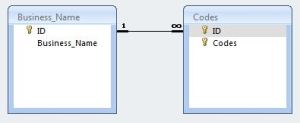
The function is currently setup without arguments but it can be easily modified for that. In it’s current setup, it’s easy to understand how to use the function and adjust it for your dataset but it would be limited to one-time use, i.e. it will need to be modified for arguments to be used in a looping algorithm.

Download: MakeCSV

Public Sub MakeCSV()
On Error GoTo ErrHandler

Dim con As ADODB.Connection
Dim rst As New ADODB.Recordset
Dim rst1 As New ADODB.Recordset
Dim cat As New ADOX.Catalog
Dim fld As ADODB.Field
Dim tbl As ADOX.Table
Set con = Application.CurrentProject.Connection
Set cat.ActiveConnection = con
Dim strSQL As String, CSVKey() As String, CSVValueList As String
Dim CSVField() As String, CSVSource As String, MasterSource As String, NewTable As String
Dim NumberOfFields As Long, x As Long, y As Long, NumberGroupFields As Long
Dim LongData As Boolean, OnlyUnique As Boolean

'Set the name for the table you want to create
NewTable = "NEW_TABLE_NAME"
'Are you dealing with long data (>255 characters) or short data?
LongData = False
'Set the name of the table or query to reference
MasterSource = "EXISTING_QUERY_OR_TABLE_NAME"
'Set the number of grouping fields
NumberGroupFields = 3
'Allocate the array - //////// DO NOT ALTER THIS LINE \\\\\\\\\\\\\\\\\\\\\\\\\\\\\\\\\\\\\\\\\\\\\\\\
ReDim CSVKey(NumberGroupFields, 1)
'Set the Name of the key field you want to reference the CSV
CSVKey(1, 0) = "GROUP_FIELD_NAME_1"
CSVKey(2, 0) = "GROUP_FIELD_NAME_2"
CSVKey(3, 0) = "GROUP_FIELD_NAME_3"
'Set the number of fields you want to turn into a CSV
NumberOfFields = 2
'Allocate the array - //////// DO NOT ALTER THIS LINE \\\\\\\\\\\\\\\\\\\\\\\\\\\\\\\\\\\\\\\\\\\\\\\\
ReDim CSVField(NumberOfFields)
'Set the name of the field or fields you want to turn into CSV
CSVField(1) = "CSV_FIELD_NAME_1"
CSVField(2) = "CSV_FIELD_NAME_2"
'CSVField(3) = "CSV_FIELD_NAME_3"
'Grab Only Unique Values for the CSV?
OnlyUnique = True

'/////////////////////// DO NOT ALTER THE LINES BELOW \\\\\\\\\\\\\\\\\\\\\\\\\\\\\\\\\\\\\\\\\\\\\\\\
'Check to see if the table exists - if it does, drop it
For Each tbl In cat.Tables
 If tbl.Name = NewTable Then
 cat.Tables.Delete NewTable
 End If
Next tbl
'Determine the data types for the CSVKey values
strSQL = "SELECT TOP 1"
For y = 1 To NumberGroupFields
 strSQL = strSQL & " [" & CSVKey(y, 0) & "],"
Next y
strSQL = Left(strSQL, Len(strSQL) - 1)
strSQL = strSQL & " FROM [" & MasterSource & "]"
With rst
 .Open strSQL, con, adOpenStatic, adLockReadOnly
 y = 1
 For Each fld In rst.Fields
 If fld.Type = 7 Then
 CSVKey(y, 1) = "Date"
 ElseIf fld.Type = 202 Then
 CSVKey(y, 1) = "Text"
 ElseIf fld.Type = adBigInt Then
 CSVKey(y, 1) = "Numeric"
 End If
 y = y + 1
 Next fld
 .Close
End With

'Create a table to hold the CSV values
strSQL = "CREATE TABLE [" & NewTable & "]"
strSQL = strSQL & " ([" & CSVKey(1, 0) & "] TEXT(255),"
If NumberGroupFields >= 2 Then
 For y = 2 To NumberGroupFields
 strSQL = strSQL & " [" & CSVKey(y, 0) & "] TEXT(255),"
 Next y
End If
For x = 1 To NumberOfFields
 If LongData = True Then
 strSQL = strSQL & " [" & CSVField(x) & "] MEMO,"
 Else
 strSQL = strSQL & " [" & CSVField(x) & "] TEXT(255),"
 End If
Next x
strSQL = Left(strSQL, Len(strSQL) - 1)
strSQL = strSQL & ")"
'Create the table
con.Execute strSQL

'Get the unique source items
For x = 1 To NumberOfFields
 'Get the distinct CSVKeys
 strSQL = "SELECT DISTINCT"
 For y = 1 To NumberGroupFields
 strSQL = strSQL & " [" & CSVKey(y, 0) & "],"
 Next y
 strSQL = Left(strSQL, Len(strSQL) - 1)
 strSQL = strSQL & " FROM [" & MasterSource & "]"
 With rst
 .Open strSQL, con, adOpenStatic, adLockReadOnly
 .MoveFirst
 While Not .EOF
 'Retrieve the values for the CSV list
 If OnlyUnique = False Then
 strSQL = "SELECT [" & CSVField(x) & "] FROM [" & MasterSource & "]"
 Else
 strSQL = "SELECT DISTINCT [" & CSVField(x) & "] FROM [" & MasterSource & "]"
 End If
 For y = 1 To NumberGroupFields
 If y = 1 Then
 If CSVKey(1, 1) = "Text" Then
 strSQL = strSQL & " WHERE ((([" & CSVKey(1, 0) & "]) = " & Chr(34) & rst.Fields(CSVKey(1, 0)) & Chr(34) & ")"
 ElseIf CSVKey(1, 1) = "Numeric" Then
 strSQL = strSQL & " WHERE ((([" & CSVKey(1, 0) & "]) = " & rst.Fields(CSVKey(1, 0)) & ")"
 ElseIf CSVKey(1, 1) = "Date" Then
 strSQL = strSQL & " WHERE ((([" & CSVKey(1, 0) & "]) = #" & rst.Fields(CSVKey(1, 0)) & "#)"
 End If
 Else
 If CSVKey(y, 1) = "Text" Then
 strSQL = strSQL & " AND (([" & CSVKey(y, 0) & "]) = " & Chr(34) & rst.Fields(CSVKey(y, 0)) & Chr(34) & ")"
 ElseIf CSVKey(y, 1) = "Numeric" Then
 strSQL = strSQL & " AND (([" & CSVKey(y, 0) & "]) = " & rst.Fields(CSVKey(y, 0)) & ")"
 ElseIf CSVKey(y, 1) = "Date" Then
 strSQL = strSQL & " AND (([" & CSVKey(y, 0) & "]) = #" & rst.Fields(CSVKey(y, 0)) & "#)"
 End If
 End If
 Next y
 strSQL = strSQL & ")"
 With rst1
 .Open strSQL, con, adOpenStatic, adLockReadOnly
 .MoveFirst
 'Create the CSV list
 While Not .EOF
 CSVValueList = CSVValueList & .Fields(CSVField(x)) & ", "
 .MoveNext
 Wend
 CSVValueList = Left(CSVValueList, Len(CSVValueList) - 2)
 .Close
 End With
 'Now insert the CSV values
 strSQL = "SELECT [" & CSVField(x) & "],"
 For y = 1 To NumberGroupFields
 strSQL = strSQL & " [" & CSVKey(y, 0) & "],"
 Next y
 strSQL = Left(strSQL, Len(strSQL) - 1)
 strSQL = strSQL & " FROM [" & NewTable & "]"
 strSQL = strSQL & " WHERE ((([" & CSVKey(1, 0) & "]) = " & Chr(34) & rst.Fields(CSVKey(1, 0)) & Chr(34) & ")"
 If NumberGroupFields >= 2 Then
 For y = 2 To NumberGroupFields
 strSQL = strSQL & " AND (([" & CSVKey(y, 0) & "]) = " & Chr(34) & rst.Fields(CSVKey(y, 0)) & Chr(34) & ")"
 Next y
 strSQL = strSQL & ")"
 Else
 strSQL = strSQL & ")"
 End If
 With rst1
 .Open strSQL, con, adOpenDynamic, adLockOptimistic
 If .BOF = True And .EOF = True Then
 'Add a new record
 .AddNew CSVKey(1, 0), rst.Fields(CSVKey(1, 0))
 For y = 2 To NumberGroupFields
 .Update CSVKey(y, 0), rst.Fields(CSVKey(y, 0))
 Next y
 .Update CSVField(x), CSVValueList
 Else
 'Record Exists
 .Update CSVField(x), CSVValueList
 End If
 .Close
 End With
 'Clear the CSV value
 CSVValueList = ""
 'Move to the next CSVKey
 .MoveNext
 Wend
 .Close
 End With
Next x

'Close the connections
con.Close
Set rst = Nothing
Set rst1 = Nothing
Set cat = Nothing
Set tbl = Nothing
Set fld = Nothing
Set con = Nothing
Exit Sub

ErrHandler:
'Close the connections
MsgBox "MakeCSV encountered error " & Err.Number & " : " & Err.Description, vbCritical + vbOKOnly, "MakeCSV Encountered Error " & Err.Number
If rst.State = adStateOpen Then
 rst.Close
End If
If rst1.State = adStateOpen Then
 rst1.Close
End If
con.Close
Set rst = Nothing
Set rst1 = Nothing
Set cat = Nothing
Set tbl = Nothing
Set fld = Nothing
Set con = Nothing
Exit Sub

End Sub
Share